
diff options
Diffstat (limited to 'README.md')
| -rw-r--r-- | README.md | 44 |
1 files changed, 26 insertions, 18 deletions
@@ -3,7 +3,7 @@ [](https://join.slack.com/t/seaweedfs/shared_invite/enQtMzI4MTMwMjU2MzA3LTEyYzZmZWYzOGQ3MDJlZWMzYmI0OTE4OTJiZjJjODBmMzUxNmYwODg0YjY3MTNlMjBmZDQ1NzQ5NDJhZWI2ZmY) [](https://twitter.com/intent/follow?screen_name=seaweedfs) -[](https://travis-ci.org/chrislusf/seaweedfs) +[](https://github.com/chrislusf/seaweedfs/actions/workflows/go.yml) [](https://godoc.org/github.com/chrislusf/seaweedfs/weed) [](https://github.com/chrislusf/seaweedfs/wiki) [](https://hub.docker.com/r/chrislusf/seaweedfs/) @@ -33,7 +33,7 @@ Your support will be really appreciated by me and other supporters! ### Gold Sponsors - +- [](https://www.nodion.com) --- @@ -41,6 +41,7 @@ Your support will be really appreciated by me and other supporters! - [Download Binaries for different platforms](https://github.com/chrislusf/seaweedfs/releases/latest) - [SeaweedFS on Slack](https://join.slack.com/t/seaweedfs/shared_invite/enQtMzI4MTMwMjU2MzA3LTEyYzZmZWYzOGQ3MDJlZWMzYmI0OTE4OTJiZjJjODBmMzUxNmYwODg0YjY3MTNlMjBmZDQ1NzQ5NDJhZWI2ZmY) - [SeaweedFS on Twitter](https://twitter.com/SeaweedFS) +- [SeaweedFS on Telegram](https://t.me/Seaweedfs) - [SeaweedFS Mailing List](https://groups.google.com/d/forum/seaweedfs) - [Wiki Documentation](https://github.com/chrislusf/seaweedfs/wiki) - [SeaweedFS White Paper](https://github.com/chrislusf/seaweedfs/wiki/SeaweedFS_Architecture.pdf) @@ -51,6 +52,8 @@ Table of Contents ================= * [Quick Start](#quick-start) + * [Quick Start for S3 API on Docker](#quick-start-for-s3-api-on-docker) + * [Quick Start with Single Binary](#quick-start-with-single-binary) * [Introduction](#introduction) * [Features](#features) * [Additional Features](#additional-features) @@ -69,16 +72,16 @@ Table of Contents * [License](#license) -## Quick Start with single binary ## +## Quick Start for S3 API on Docker ## + +`docker run -p 8333:8333 chrislusf/seaweedfs server -s3` + +## Quick Start with Single Binary ## * Download the latest binary from https://github.com/chrislusf/seaweedfs/releases and unzip a single binary file `weed` or `weed.exe` * Run `weed server -dir=/some/data/dir -s3` to start one master, one volume server, one filer, and one S3 gateway. Also, to increase capacity, just add more volume servers by running `weed volume -dir="/some/data/dir2" -mserver="<master_host>:9333" -port=8081` locally, or on a different machine, or on thousands of machines. That is it! -## Quick Start for S3 API on Docker ## - -`docker run -p 8333:8333 chrislusf/seaweedfs server -s3` - ## Introduction ## SeaweedFS is a simple and highly scalable distributed file system. There are two objectives: @@ -93,13 +96,6 @@ and these volume servers manage files and their metadata. This relieves concurrency pressure from the central master and spreads file metadata into volume servers, allowing faster file access (O(1), usually just one disk read operation). -SeaweedFS can transparently integrate with the cloud. -With hot data on local cluster, and warm data on the cloud with O(1) access time, -SeaweedFS can achieve both fast local access time and elastic cloud storage capacity. -What's more, the cloud storage access API cost is minimized. -Faster and Cheaper than direct cloud storage! -Signup for future managed SeaweedFS cluster offering at "seaweedfilesystem at gmail dot com". - There is only 40 bytes of disk storage overhead for each file's metadata. It is so simple with O(1) disk reads that you are welcome to challenge the performance with your actual use cases. @@ -115,6 +111,12 @@ For any distributed key value stores, the large values can be offloaded to Seawe With the fast access speed and linearly scalable capacity, SeaweedFS can work as a distributed [Key-Large-Value store][KeyLargeValueStore]. +SeaweedFS can transparently integrate with the cloud. +With hot data on local cluster, and warm data on the cloud with O(1) access time, +SeaweedFS can achieve both fast local access time and elastic cloud storage capacity. +What's more, the cloud storage access API cost is minimized. +Faster and Cheaper than direct cloud storage! + [Back to TOC](#table-of-contents) ## Additional Features ## @@ -147,6 +149,8 @@ SeaweedFS can work as a distributed [Key-Large-Value store][KeyLargeValueStore]. * [WebDAV] accesses as a mapped drive on Mac and Windows, or from mobile devices. * [AES256-GCM Encrypted Storage][FilerDataEncryption] safely stores the encrypted data. * [Super Large Files][SuperLargeFiles] stores large or super large files in tens of TB. +* [Cloud Drive][CloudDrive] mounts cloud storage to local cluster, cached for fast read and write with asynchronous write back. +* [Gateway to Remote Object Store][GatewayToRemoteObjectStore] mirrors bucket operations to remote object storage, in addition to [Cloud Drive][CloudDrive] ## Kubernetes ## * [Kubernetes CSI Driver][SeaweedFsCsiDriver] A Container Storage Interface (CSI) Driver. [](https://hub.docker.com/r/chrislusf/seaweedfs-csi-driver/) @@ -169,6 +173,9 @@ SeaweedFS can work as a distributed [Key-Large-Value store][KeyLargeValueStore]. [ActiveActiveAsyncReplication]: https://github.com/chrislusf/seaweedfs/wiki/Filer-Active-Active-cross-cluster-continuous-synchronization [FilerStoreReplication]: https://github.com/chrislusf/seaweedfs/wiki/Filer-Store-Replication [KeyLargeValueStore]: https://github.com/chrislusf/seaweedfs/wiki/Filer-as-a-Key-Large-Value-Store +[CloudDrive]: https://github.com/chrislusf/seaweedfs/wiki/Cloud-Drive-Architecture +[GatewayToRemoteObjectStore]: https://github.com/chrislusf/seaweedfs/wiki/Gateway-to-Remote-Object-Storage + [Back to TOC](#table-of-contents) @@ -322,7 +329,7 @@ When requesting a file key, an optional "dataCenter" parameter can limit the ass [Back to TOC](#table-of-contents) -## Architecture ## +## Object Store Architecture ## Usually distributed file systems split each file into chunks, a central master keeps a mapping of filenames, chunk indices to chunk handles, and also which chunks each chunk server has. @@ -497,7 +504,7 @@ git clone https://github.com/chrislusf/seaweedfs.git Step 3: download, compile, and install the project by executing the following command ```bash -make install +cd seaweedfs/weed && make install ``` Once this is done, you will find the executable "weed" in your `$GOPATH/bin` directory @@ -588,6 +595,7 @@ The text of this page is available for modification and reuse under the terms of [Back to TOC](#table-of-contents) -## Stargazers over time ## +## Stargazers over time + +[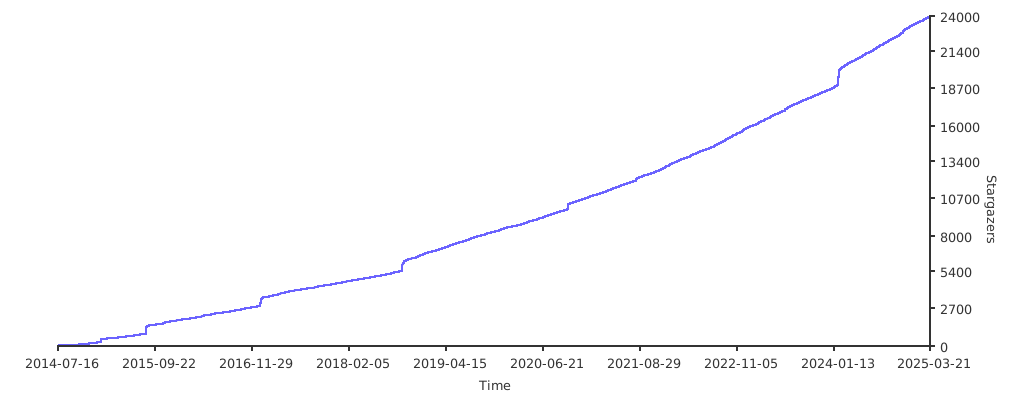](https://starchart.cc/chrislusf/seaweedfs) -[](https://starcharts.herokuapp.com/chrislusf/seaweedfs) |